Creating high-quality visual content once required a combination of photography, graphic design, photo-editing software, and plenty of time. Today, artificial intelligence is changing that process by allowing creators to generate and modify images through simple written instructions. Instead of manually selecting objects, adjusting layers, or rebuilding an entire scene, users can describe the desired result and let an AI system handle much of the visual work.
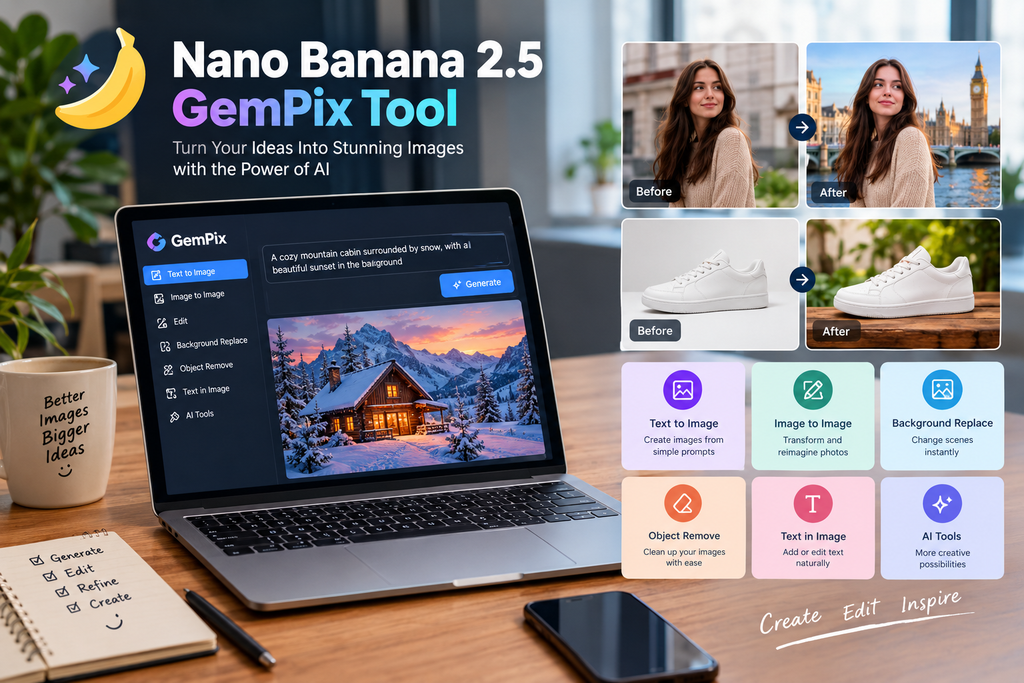
One example of this evolving workflow is the Nano Banana 2.5 GemPix tool which represents the growing shift toward prompt-based image creation and editing. GemPix describes its image experience as supporting both text-to-image generation and image-to-image editing, with tools for changing backgrounds, replacing objects, refining details, and working with text inside images.
From Traditional Editing to Prompt-Based Creation
Traditional image editing often involves multiple steps. A designer may need to isolate a subject, remove an unwanted object, adjust lighting, replace a background, and then correct shadows so everything looks natural.
AI-assisted editing changes the interaction model. Rather than performing every adjustment manually, a user can explain the intended change in ordinary language. For example, a prompt might say:
“Replace the background with a modern office, keep the person’s pose unchanged, and use soft natural lighting.”
This approach does not eliminate the need for creative judgment, but it can reduce the number of repetitive editing steps. GemPix’s current editor is designed around this type of instruction-based workflow, allowing users to specify what should change while also describing elements that need to remain consistent.
Why Image Consistency Matters
Generating one attractive image is only part of the challenge. For professional projects, consistency is often more important.
A social media campaign, online store, or marketing project may require several visuals featuring the same product, person, setting, or visual identity. Small differences between images can make a campaign look disconnected.
AI editing tools are increasingly focused on preserving important parts of an original image while changing selected elements. GemPix, for example, highlights subject and product consistency, background replacement, object manipulation, and visual coherence as practical parts of its editing workflow.
This can be especially useful for ecommerce businesses. A seller might have a basic product photograph and need several versions for different campaigns. Instead of arranging a new photoshoot for every variation, AI can help explore different backgrounds, lighting conditions, and compositions using the existing image as a starting point.
Better Visual Content Without a Complicated Workflow
Another important development is accessibility. Advanced editing applications can be powerful, but they can also take time to learn. Prompt-based tools offer a more direct alternative for users who understand what they want visually but do not necessarily have advanced design skills.
A creator can start with a simple idea, generate a result, identify what needs to change, and refine the prompt. This creates an iterative workflow:
Idea → Prompt → Image → Review → Refine
The process is similar to working with a creative assistant. The first result does not have to be perfect. Instead, it provides a starting point that can be improved through additional instructions.
GemPix specifically recommends describing the subject first and then adding details such as style, lighting, composition, mood, and other visual requirements. For editing tasks, it also suggests identifying what should remain unchanged.
Practical Uses for AI Image Tools
The value of these systems becomes clearer when looking at everyday applications.
Ecommerce Photography
Online sellers often need clean, attractive product images. AI can assist with background changes, removing distractions, adjusting visual presentation, and producing alternative versions of a product scene.
Social Media Graphics
Social platforms demand a steady supply of fresh visual content. AI image generators can help creators experiment with post concepts, thumbnails, story graphics, and promotional designs without starting every image from scratch.
Posters and Promotional Materials
Text inside images has historically been challenging for image-generation systems. Improvements in text rendering are making AI more useful for posters, signs, labels, packaging concepts, and social graphics where readable wording matters. GemPix lists in-image text generation and replacement among the supported editing capabilities of its Nano Banana 2 workflow.
Creative Exploration
Designers can use AI during the early stages of a project to explore different visual directions. A single concept can be turned into several moods, compositions, or styles before the final design is selected.
Writing Better Prompts
The quality of an AI-generated image depends heavily on how the request is written. Very short prompts may leave too much room for interpretation.
Instead of saying:
“Make this photo better.”
A more useful instruction might be:
“Keep the product shape and camera angle unchanged, replace the background with a clean white studio setting, add soft shadows, and create a realistic ecommerce photography style.”
The second prompt provides boundaries as well as creative direction.
For editing, it is also useful to separate the request into three parts: what should change, what should stay the same, and what the finished image should look like. This gives the model a clearer visual brief and makes subsequent revisions easier.
AI Is a Creative Tool, Not a Replacement for Judgment
Despite rapid improvements, AI-generated images still benefit from human review. Generated details may sometimes look unnatural, text may require correction, and an image that technically follows a prompt may still miss the intended artistic direction.
That is why the strongest workflow is usually collaborative. The creator defines the objective, reviews the output, identifies weaknesses, and makes targeted adjustments. AI can accelerate experimentation, but human judgment remains important for branding, storytelling, accuracy, and visual quality.
Creators should also consider copyright, privacy, misleading imagery, and the terms governing commercial use. GemPix states that its generated images can be used for personal and commercial work, while also advising users to review applicable terms and respect legal boundaries.
The Future of Everyday Image Creation
AI image technology is moving beyond simple text-to-picture generation. Modern workflows increasingly combine generation, editing, compositing, restyling, and refinement in one process.
Tools such as the Nano Banana 2.5 GemPix tool illustrate this broader direction: instead of treating image generation and photo editing as completely separate tasks, they bring both into a prompt-driven environment.
For bloggers, marketers, designers, ecommerce owners, and content creators, the biggest benefit may not simply be speed. It is the ability to turn an idea into a visual concept, test multiple possibilities, and refine the result without rebuilding everything manually.
As these systems continue to improve, the role of the creator is likely to shift from performing every technical editing task toward directing, evaluating, and refining the final visual experience.